
At SKIKK we are of course proud of our products and we love to talk about them. But who better to talk about SKIKK and its products than our own customers.
That is why we regularly publish articles with reviews and experiences from our customers. This time it is TheLuckys' turn, who recently posted a review on technology news website Tweakers
Verdict:
Exceptionally fast laptop at a very decent price that is also light and portable. An absolute must-have for every gamer who does not always want to sit behind the same desk.

Pros
- Build quality
- Display
- Speed
- Cooling
- Keyboard
- Touchpad
Cons
- Mediocre speakers
- Webcam below the screen
Specifications
The base configuration of the SKIKK 15GMHY includes:- 15.6" 1080p 144Hz IPS
- Intel Core-i7 10875H 8C/16T
- Nvidia GeForce RTX 2070 Super 8GB (Max-P 115W)
- 32GB Dual-Channel DDR4-2933
chassis
The chassis of the SKIKK 15GMHY is built from magnesium and feels solid. Together with the glass touchpad and the very sturdy keyboard, it feels like quality. With its very thin screen bezels and thickness of just 22mm, the laptop is also extremely portable. The magnesium housing makes for a surprisingly light laptop (1.75kg). This is lighter than a 2017 Macbook Pro 15, which weighs 1.81kg.
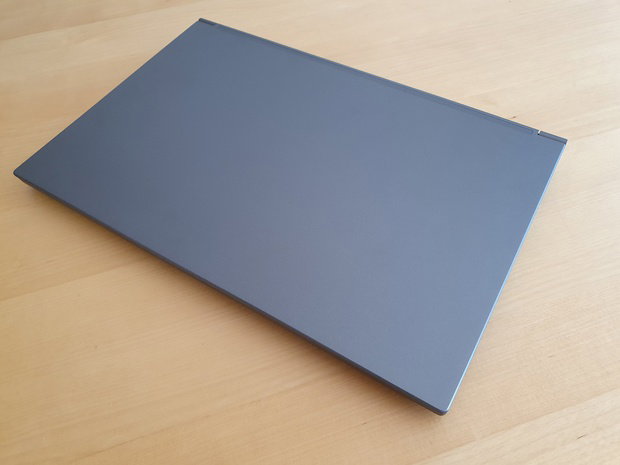
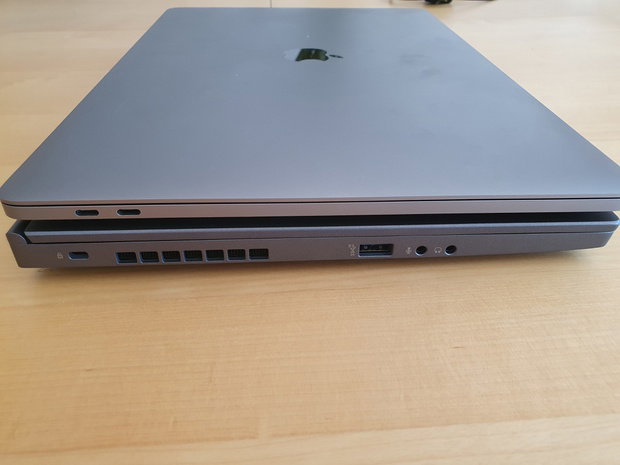
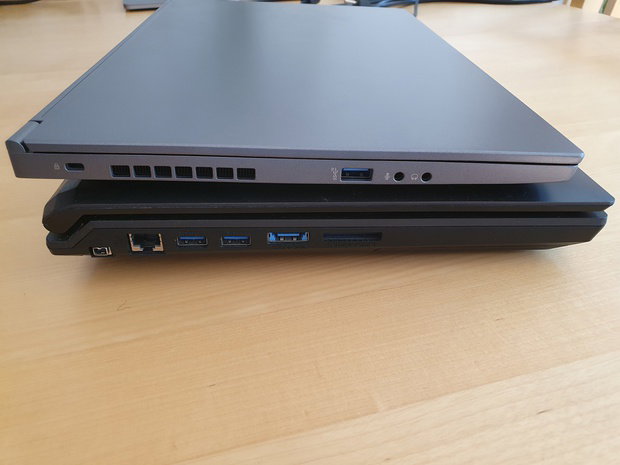
The laptop is considerably thinner than the thick gaming laptops of old, such as my Clevo P150EM.
The front of the chassis features an RGB light bar that can be configured to your liking via the included software.
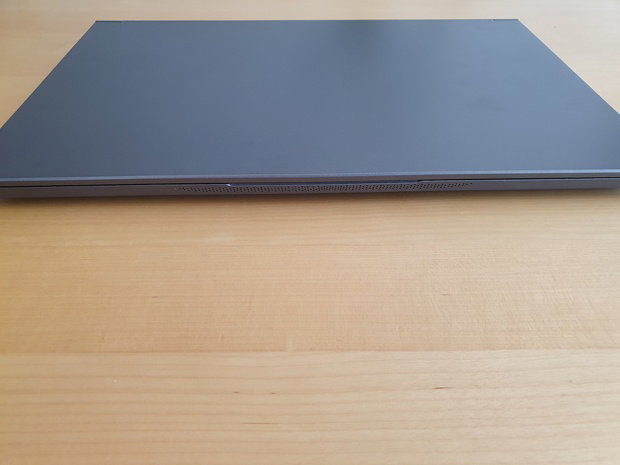
Unfortunately, my model does not appear to be completely straight and wobbles slightly when placed on a flat surface. Luckily, this was easily fixed by gently bending the laptop back into shape.
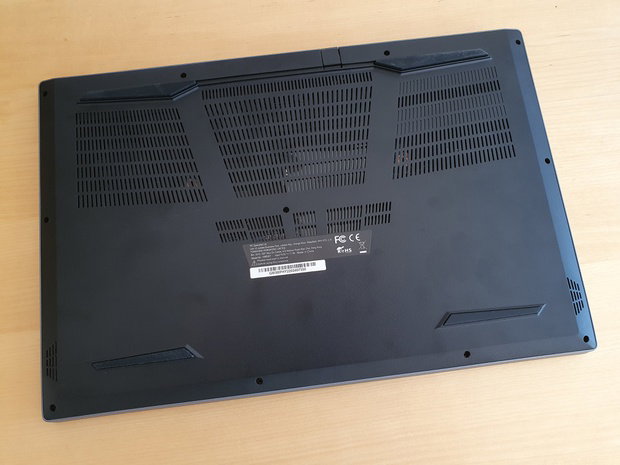
The bottom of the laptop features many ventilation grilles; this is a laptop that should be used on a hard surface.
Connections
The SKIKK 15GMHY fortunately does not follow the recent trend of replacing all connections with USB-C/Thunderbolt connections.
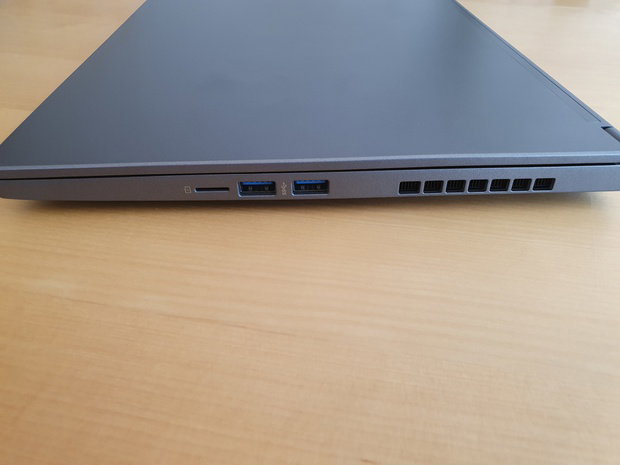
On the right side of the chassis we find 2 USB 3.2 Gen 1 5Gb/s ports and a micro-SD card reader.
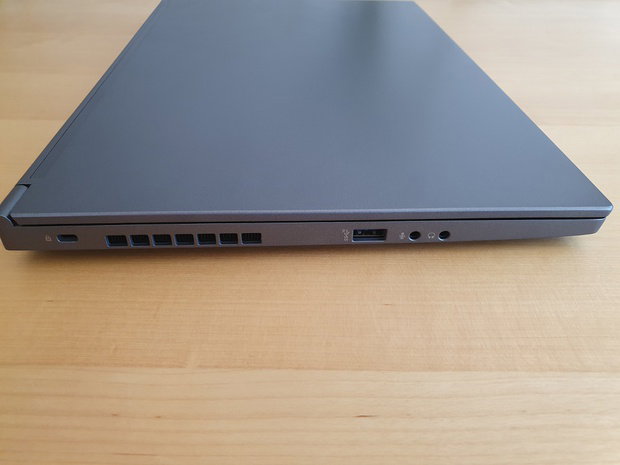
On the left side of the chassis we find a USB 3.2 Gen 2 10Gb/s port and 3.5mm headset and microphone connections.
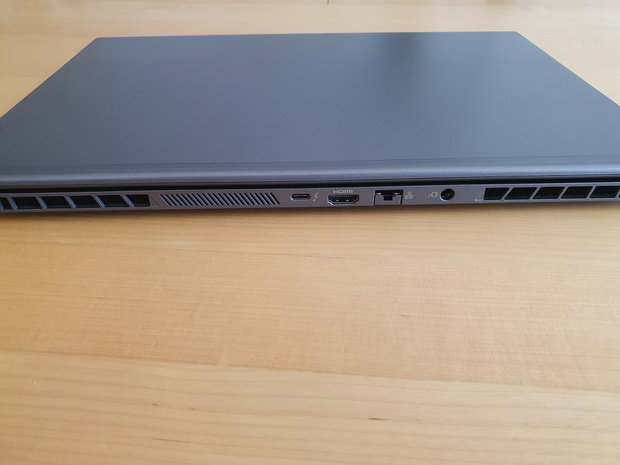
On the rear of the laptop we find an HDMI 2.0, Thunderbolt 3, Gigabit Ethernet and the adapter connections.
The Thunderbolt 3 connection cannot be used to charge the laptop, but there are also no USB-C chargers on the market that can deliver the required power, so this is not a major drawback.
Screen
The SKIKK 15GMHY has a 15.6" 1080p IPS panel with a refresh rate of 144Hz. The high refresh rate provides a very smooth experience. Combined with the excellent glass touchpad, scrolling through a website is a real pleasure! The screen is fairly bright, but not as bright as, for example, the screen on a recent Macbook Pro. I don't have the equipment to test the colour gamut and calibration, but the screen looks calibrated and the colour gamut appears to be more than sufficient.Unfortunately, in its mission to make the screen bezels as thin as possible, SKIKK has placed the webcam below the screen. Due to its placement, the built-in Windows Hello functionality is not very usable, as your face is not visible to the webcam in a normal posture.
Keyboard and touchpad
The SKIKK 15GMHY has a keyboard with a numeric section. Unfortunately, due to a lack of space, the decision was made to shorten the numeric section slightly. The last row of keys, which normally includes the enter key among others, has been omitted as a result. This makes the numeric section of the keyboard less usable, unfortunately, but given the lack of space I am glad they chose not to include the last row of buttons and shrink the entire keyboard instead.
The keys on the keyboard are fairly square for a traditional laptop chiclet keyboard. This means it takes a brief moment to get used to before you can type on it quickly and confidently. Fortunately, the feel of the keystrokes is very pleasant. The keys are stable and can be pressed down sufficiently. I typed this entire review on the SKIKK 15GMHY and I already find the keyboard better than that of my Macbook Pro 15 from 2017.
Above the keyboard we find the power button and a button to quickly switch between power profiles. There are 3 modes available here: Office, Gaming, and Turbo. The profiles affect the energy consumption, and therefore the performance, of the CPU and GPU. In the Office profile, the included software also allows you to specify how you want the fans to operate. For example, they can be switched off entirely.
The keyboard features RGB lighting. You can configure the lighting in 4 zones via the included software. The lighting is not as bright or as attractive as in keyboards where the lighting can be set per key, but it is more than sufficient to clearly see where each key is located in a dark room.
The glass touchpad feels very pleasant. The texture is very similar to that of the trackpad on a Macbook. It is a Precision Touchpad, which means that the tracking works excellently and there is support for various gestures within Windows. Just like with a Macbook, using the laptop with the touchpad is truly no hardship.
If you use a separate mouse for gaming, for example, the touchpad can easily be disabled by tapping twice in the upper left corner. That way it won't bother you while gaming! When the touchpad is disabled, this is clearly visible because a white LED lights up in the upper left corner of the touchpad.
Speakers
The SKIKK 15GMHY is equipped with stereo speakers built into the bottom of the chassis. The speakers are above average for an average gaming laptop. When we compare them to the speakers in a Macbook Pro 15, they unfortunately still don't come close. The included THX Spatial Audio software helps to give the sound much more space, but low tones are unfortunately not really present with these speakers. Fortunately, they can get loud enough to rise above the fans while gaming.Adapter
The SKIKK 15GMHY comes with a fairly slim 230W adapter. This is much easier to carry than the adapter of my Clevo P150EM, which is the size and weight of a hefty brick.
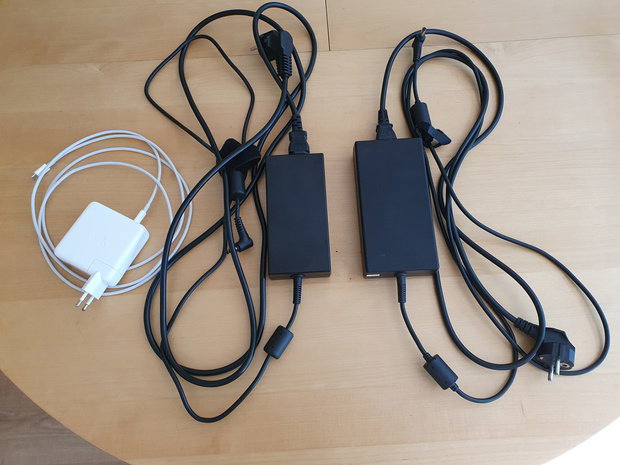
The adapter of the SKIKK 15GMHY does get quite hot during gaming, so it is not advisable to place anything on top of it.
Performance
The SKIKK 15GMHY is fast. Very fast. I'm used to fairly fast PCs, and the SKIKK 15GMHY is absolutely one of the fastest. After reading many negative stories about the 10th generation Intel processors, my expectations of the CPU were not particularly high. When running the first benchmarks, it quickly became clear that the Core-i7 10875H is no slow CPU.
When looking at performance, I compare the SKIKK 15GMHY in many cases with my current desktop. In short, this is a 4.0GHz Core-i7 6800K with an RTX 2070 Super (2010MHz core, 7800MHz memory) and 32GB DDR4-2400. In some benchmarks I will also compare the laptop with my 2017 Macbook Pro 15 (Core-i7 7700HQ, Radeon Pro 555 2GB, 16GB DDR4-2133), my Clevo P150EM (Core-i7 3630QM, 675MX 4GB, 16GB DDR3-1600) and sometimes even my old Alienware M11xR3 (Core-i7 2617M, GT540M 4GB, 8GB DDR3-1333). Apart from the Macbook, all systems are running Windows 10 with the latest updates and drivers.
Benchmarks
Cinebench R20
I will first cover the laptop's performance in synthetic benchmarks, starting with Cinebench R20. Cinebench R20 is an excellent multi-core CPU benchmark that puts CPUs under heavy load with AVX instructions.
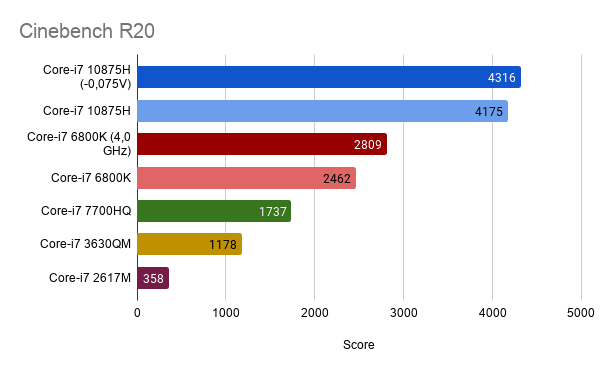
What immediately becomes clear here is that the Core-i7 10875H is an extremely fast chip. The 6800K 6C/12T desktop CPU clocked at 4GHz with a 140W TDP simply cannot keep up with the comparatively very efficient laptop CPU. And compared to my nearest other laptop, the 2017 Macbook Pro 15 with a Core-i7 7700HQ, the Core-i7 10875H in the SKIKK 15GMHY is well over 2x faster. And this while these CPUs are based on a very similar architecture and also share the same 45W TDP.
The Core-i7 10875H does run hot — the maximum temperature of 95°C is reached very quickly, causing clock speeds to be throttled down. This means, among other things, that undervolting the CPU, which is possible with the SKIKK 15GMHY, has a considerable impact on the score in this benchmark.
Unigine Superposition
The Superposition benchmark by Unigine provides a good indication of the graphical performance in a system. For the benchmark I used the 1080p Extreme preset.
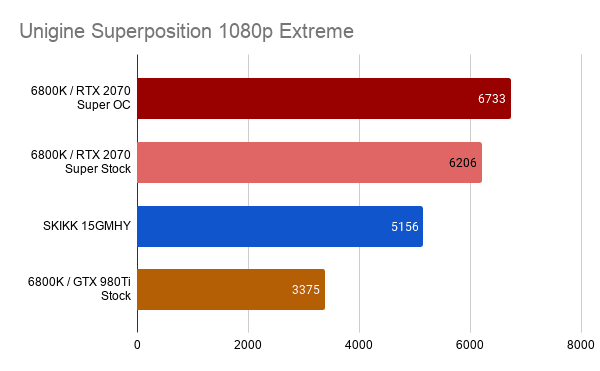
I still had a result available from the 6800K PC with an old GTX 980Ti GPU, which is also visible in this comparison. This clearly shows what enormous progress gaming laptops have made.
Unigine Heaven
Heaven is an older benchmark from Unigine, primarily designed to measure the tessellation performance of GPUs. I added this benchmark to be able to make a graphical-level comparison with the GTX 675MX from my Clevo P150EM laptop and the Radeon Pro 555 from my Macbook Pro 15. For the benchmark I used the Extreme preset, which uses a resolution of 1600x900. The Macbook is the only system that had to use the OpenGL API instead of DirectX 11.
For this benchmark I also had a result from the 6800K desktop PC with an old GTX 980Ti GPU.
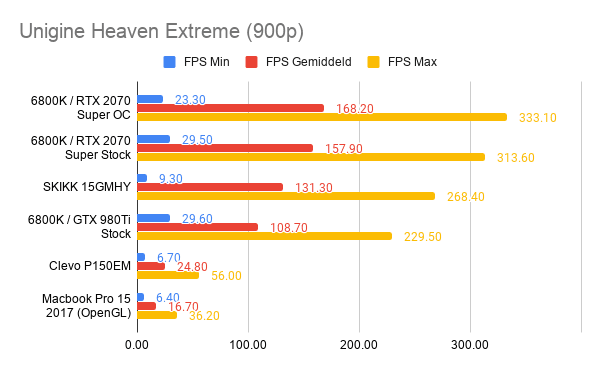
Given the results, there is really no comparison to be made between the SKIKK 15GMHY and the older Clevo P150EM and the Macbook Pro 15. It is clear that the Macbook Pro is not intended for gaming.
The desktop GTX 980Ti also falls short against the mobile RTX 2070 Super, even though the desktop card has more than double the wattage.
Games
Metro Exodus
Metro Exodus is the most recent game in the Metro series. It is a very recent game that can make use of the ray tracing hardware of Nvidia's RTX line. For this game I used the settings that deliver a playable result in the game itself.The settings are as follows:
- Resolution: 1920 x 1080
- DirectX: DirectX 12
- Quality: High
- Texture filtering: AF 16X
- Motion Blur: Normal
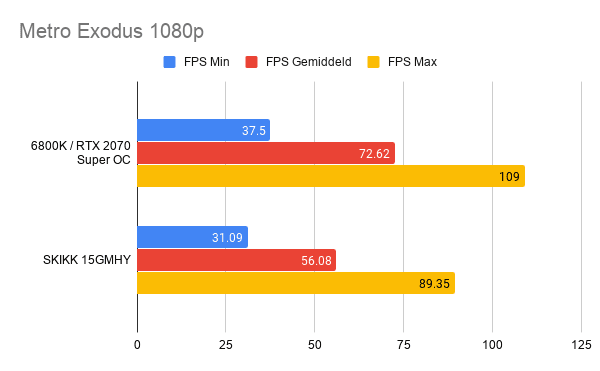
It is clearly visible that Metro Exodus is a very demanding game. Even the most powerful modern desktop PC struggles to deliver a playable framerate at high quality. All in all, the result achieved by the light and relatively thin 15GMHY laptop is truly impressive.
Wolfenstein Youngblood
Wolfenstein Youngblood makes excellent use of Nvidia's DLSS 2.0 AI upscaling technique. The resulting image is virtually indistinguishable from one that has actually been rendered at resolution by the GPU. In Metro Exodus, an older version of the technique has been implemented which I do not use due to poor image quality. For Wolfenstein Youngblood, however, it is a no-brainer!
As settings for this game I used Ultra.
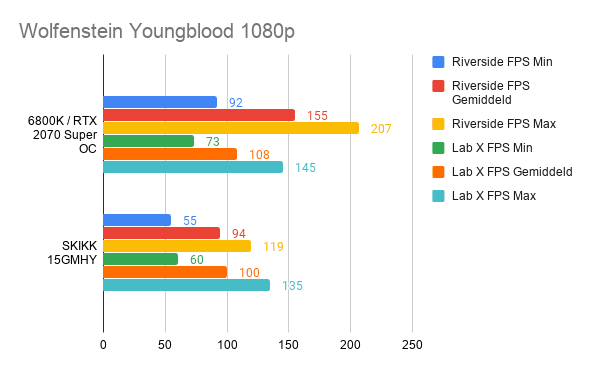
What stands out enormously in these results is that the desktop has a considerable lead in the Riverside benchmark, but the results in the Lab X benchmark are very close to each other!
Rise of the Tomb Raider
Rise of the Tomb Raider is not the most recent release in the Tomb Raider series. For this reason, the settings can be maxed out. As display options I used the 1920x1080 resolution with SMAA enabled and Vsync disabled. The graphics quality settings are individually set to maximum.
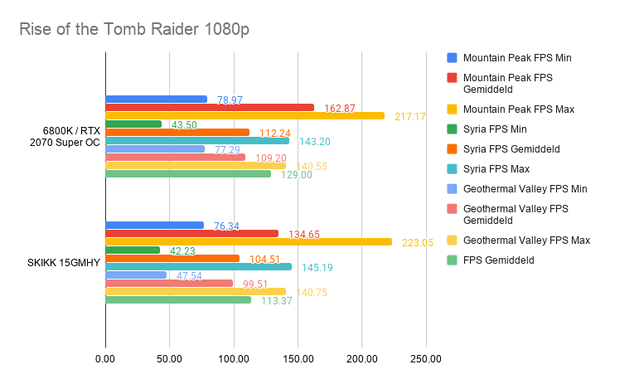
The 15GMHY laptop comes remarkably close to the bulky desktop here. It is interesting to see that the peaks of the laptop are consistently higher than those of the desktop, something that is most likely due to the more powerful CPU in the 15GMHY.
Far Cry 2
Far Cry 2 is a fairly old title that I have only included in the benchmark list so that I can compare the 15GMHY at a game level with the Clevo P150EM. Because the game is so old, the maximum graphics settings were used and DirectX 10 and 8x AA were chosen.
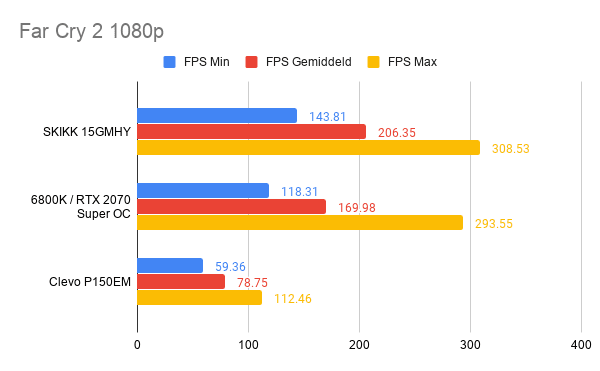
This game is clearly bottlenecked by modern-day CPUs. This gives the faster Core-i7 10875H in the 15GMHY a good advantage over the Core-i7 6800K desktop system.
Cooling
For such a thin and powerful laptop, the 15GMHY remains surprisingly cool. I had expected it to run into some temperature limits, but this turns out not to be the case during gaming. Unfortunately, I cannot say whether the optional Noctua NT-H2 thermal paste is partly responsible for this, but it will at least not work against it.During gaming, the GPU reaches 77°C at a room temperature of 25°C. This is still 10°C below the maximum temperature of 87°C.
The CPU temperature fluctuates during gaming between 70°C and 85°C at a room temperature of 25°C.
However, when a very heavy multi-threaded load is placed on the CPU, the temperature shoots almost immediately to the maximum of 95°C and stays there until the load disappears. This is accompanied by quite a lot of noise coming from the 2 fans in the laptop. The fans do seem efficient; I never expected a laptop to be able to move so much air.
During gaming, the noise from the fans is fortunately fairly manageable. The built-in microphone is moreover tuned to suppress the sound of the fans excellently. Your fellow gamers will therefore not be bothered by this on voice comms.
Battery life
Battery life is almost never a priority with gaming laptops. With the SKIKK 15GMHY, that is no different. Expect that you won't last much longer than 1.5 - 2 hours without a power outlet, even in the most energy-saving mode.Gaming on battery while on the go is also not really possible. Without mains power, the RTX 2070 Super is limited to 300MHz on the core, and you won't be able to game seriously with this.